Introduction
If you own a MacBook Pro with Apple Silicon (M1 through M5 generation), you already have hardware specifically designed for machine learning. The challenge is finding the right software to unlock its potential.
This guide covers three tools that form a natural progression:
| Tool | Purpose | Best For |
|---|---|---|
| MLX | Core framework by Apple Research | Experimentation & scripting |
| oMLX | Fast caching inference server | Coding agents & chat apps |
| MTPLX | Multi-tenant server with API compatibility | Team deployments |
Why Run LLMs Locally?
Privacy & Data Security
When you use cloud AI services, your data travels to external servers. Local AI keeps proprietary code, client data and personal information on your machine. This simplifies compliance with HIPAA, GDPR and internal security policies.
Cost Savings
Heavy Codex users often see monthly bills jump from $20 to $100-200. Analysis shows 80% of tokens are consumed by repetitive tasks: commit messages, batch translation, organizing notes and editing email drafts. Local models handle these at zero marginal cost.
Speed & Control
No network round-trip means responses start instantly. No rate limits. No API downtime. Works offline. You choose any model without vendor lock-in.
Understanding Apple Silicon
The Unified Memory Advantage
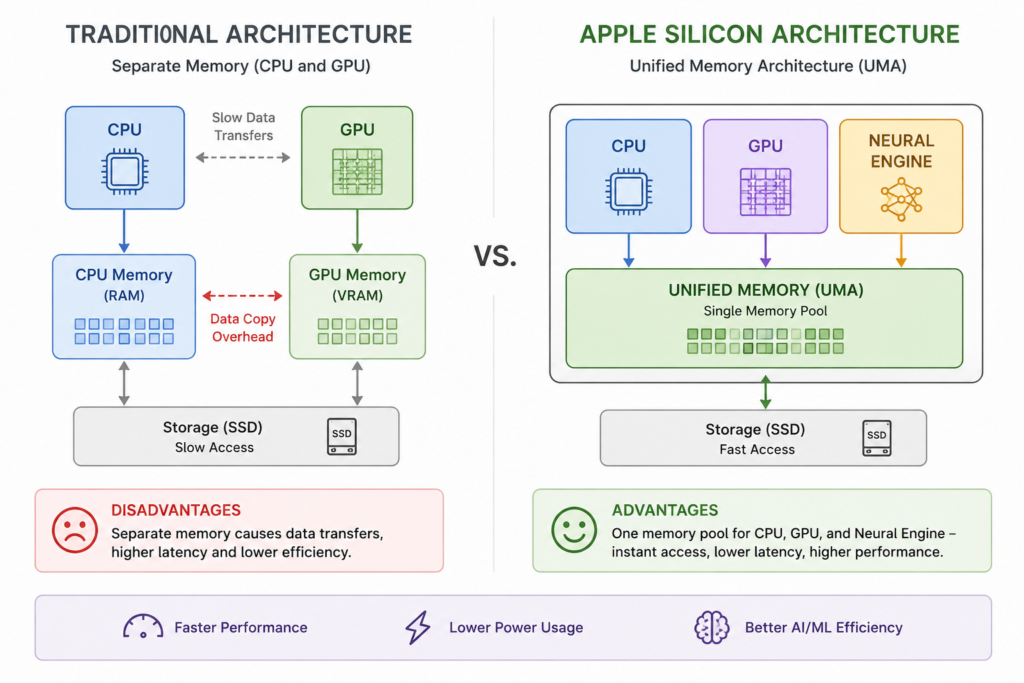
Traditional computers separate CPU and GPU memory, causing slow data transfers. Apple Silicon uses Unified Memory Architecture (UMA): the CPU, GPU and Neural Engine share one memory pool with instant access.
Why Memory Bandwidth Matters
LLM inference is memory-bandwidth bound, not compute-bound. The GPU spends most of its time waiting for model weights to load from memory. Higher bandwidth means faster token generation. This is why Max and Ultra chips with 400+ GB/s significantly outperform base chips.
Chip Comparison for LLM Workloads
| Chip | Max RAM | GPU Cores | Memory Bandwidth | Best Model Size |
|---|---|---|---|---|
| M1 | 16GB | 7–8 | 68 GB/s | 7B Q4 |
| M1 Pro/Max | 32–64GB | 14–32 | 200–400 GB/s | 14–30B Q4 |
| M2 | 24GB | 8–10 | 100 GB/s | 7–14B Q4 |
| M2 Pro/Max | 32–96GB | 16–38 | 200–400 GB/s | 30–70B Q4 |
| M3 | 24GB | 10 | 100 GB/s | 7–14B Q4 |
| M3 Pro/Max | 36–128GB | 14–40 | 150–400 GB/s | 35–100B Q4 |
| M4 | 32GB | 10 | 120 GB/s | 14–30B Q4 |
| M4 Pro/Max | 64–128GB | 16–40 | 273–546 GB/s | 35–120B Q4 |
| M5 generation | 24–48GB | 16+ | 200+ GB/s | 35B Q4 |
MLX: The Foundation
What Is MLX?
MLX is an open-source array framework developed by Apple Machine Learning Research. Unlike other ML libraries, it was built specifically for Apple Silicon’s Unified Memory Architecture. It is the only major framework that treats shared memory as a native feature rather than a compatibility layer.
Key Features
| Feature | Benefit |
|---|---|
| Unified Memory | No data copying between CPU and GPU |
| Lazy Computation | Optimizes operations before execution |
| NumPy-like API | Familiar syntax for Python developers |
| Quantization Support | Run larger models with less memory |
Getting Started
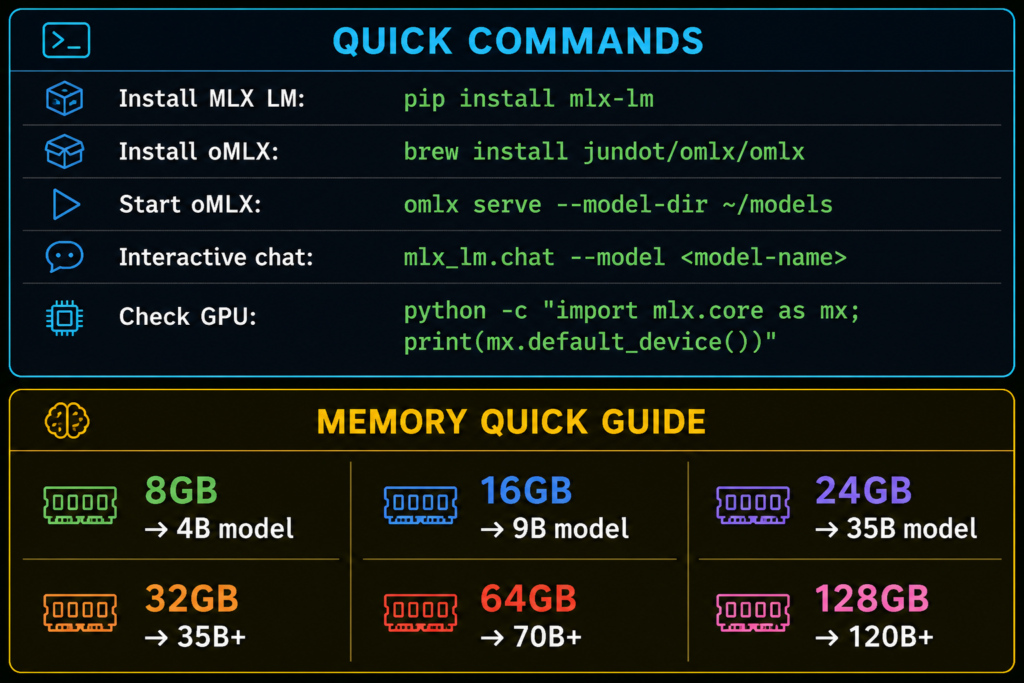
Install MLX LM:
pip install mlx-lm
Generate text with a few lines:
from mlx_lm import load, generate

model, tokenizer = load("mlx-community/Qwen2.5-7B-Instruct-4bit")
text = generate(
    model,
    tokenizer,
    prompt="Write a story about Keralam",
    verbose=True
)
The model downloads automatically and runs on your GPU. The load function handles quantization and caching. The generate function handles tokenization, inference and decoding.
Command-Line Usage
# Generate text
mlx_lm.generate --model mlx-community/Qwen2.5-7B-Instruct-4bit \
  --prompt "Explain quantum computing" \
  --max-tokens 200

# Interactive chat
mlx_lm.chat --model mlx-community/Qwen2.5-7B-Instruct-4bit
Understanding Quantization
What Is Quantization?
| Precision | Bits per Weight | Memory for 7B Model | Quality |
|---|---|---|---|
| FP32 | 32 bits | ~28GB | Perfect |
| FP16 | 16 bits | ~14GB | Excellent |
| Q8_0 | 8 bits | ~7GB | Very Good |
| Q6_K | 6 bits | ~5.5GB | Good |
| Q5_K_M | 5 bits | ~4.5GB | Good |
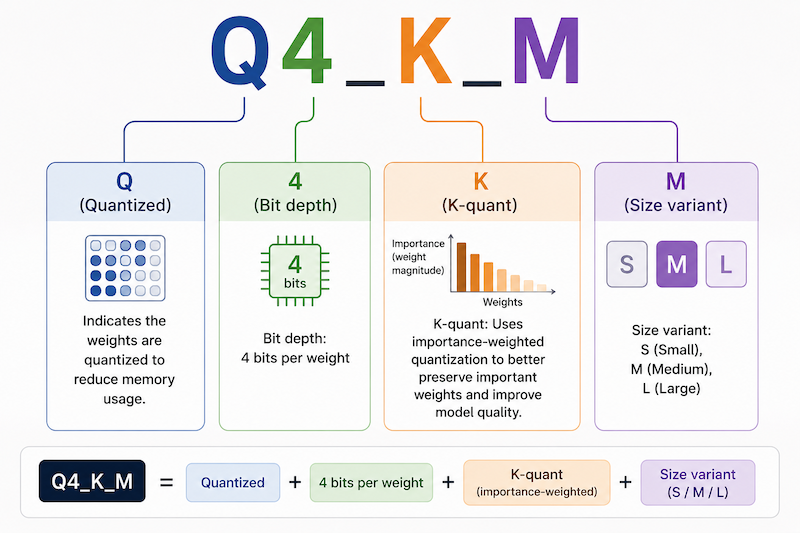
| Q4_K_M | 4 bits | ~4GB | Acceptable |
| Q3_K | 3 bits | ~3GB | Degraded |
Decoding Quantization Names
Recommended by Use Case
| Use Case | Recommended | Why |
|---|---|---|
| Coding assistance | Q4_K_M | Good balance, faster responses |
| Creative writing | Q5_K_M or Q6_K | Better nuance and coherence |
| Translation | Q4_K_M | Sufficient quality |
| Complex reasoning | Q6_K or Q8_0 | Preserves model intelligence |
| Memory-constrained | Q4_K_S | Smallest viable option |
The Problem With Local LLMs
1. Memory Constraints
2. Context Window Limits
Every token in a conversation needs memory. Long conversations exhaust available RAM. A 16K context window on a 24GB machine running a 35B model is tight. Push to 32K and the model crashes.
3. Speed vs. Quality Trade-off
| Model Size | Speed | Capability |
|---|---|---|
| 7B | ~100 tokens/sec | Basic tasks |
| 35B | ~15–25 tokens/sec | Complex reasoning |
oMLX: The Solution
What oMLX Actually Does
Key Features
| Feature | What It Does |
|---|---|
| Two-Tier Cache | Hot cache in RAM, cold cache on SSD |
| Persistent Context | Survives restarts, no lost conversations |
| Continuous Batching | Multiple requests share model weights |
| 2× Faster | Compared to Ollama |
| 50% Less Memory | More headroom for context |
How oMLX Addresses Each Problem
- Memory Efficiency: Uses MLX’s native quantization. A 24GB MacBook Pro can run a 35B model with headroom for context, where Ollama would struggle or crash.
- Context Management: The persistent cache stores conversation context to disk. Restart the server or switch conversations and the cache restores instantly. The system promotes frequently used blocks to hot RAM and demotes rarely used blocks to cold SSD storage.
- Speed Optimization: Continuous batching allows multiple requests to share model weights. Instead of loading separately for each request, oMLX processes them together, improving throughput by over 2x.
- Thermal Awareness: The native macOS menu bar app monitors temperature and throttling in real time. Adjust concurrency or model size to stay within sustainable temperatures.
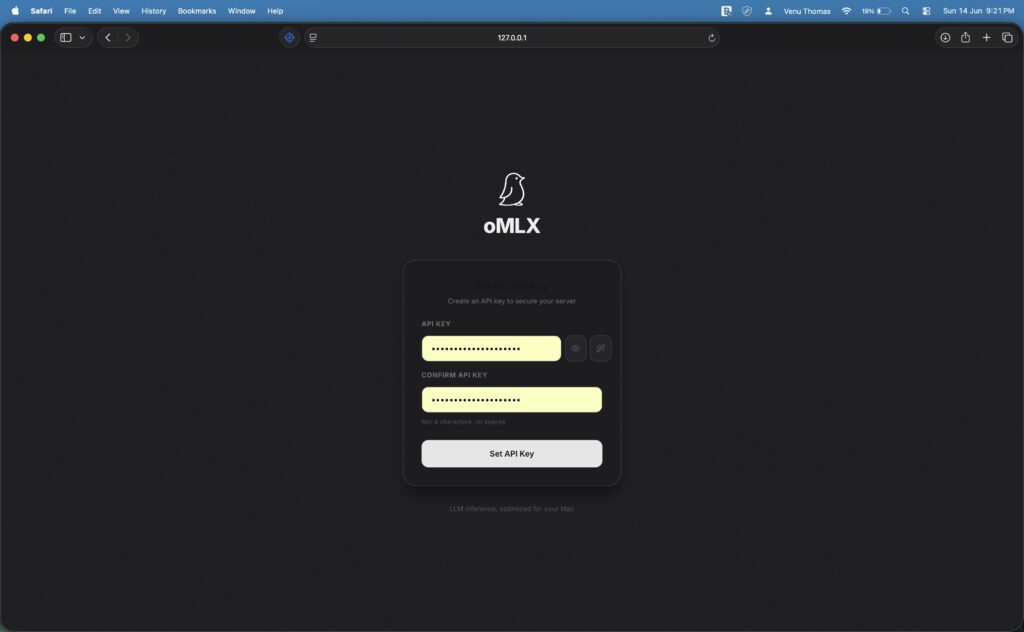
- Tooling Simplicity: Install via Homebrew, start with one command, interact through a web dashboard or API. No configuration files, no format conversions, no manual cache management.
Installation
brew tap jundot/omlx https://github.com/jundot/omlx
brew trust jundot/omlx
brew install omlx
Running the Server
omlx serve \
  --model-dir ~/models \
  --hot-cache-max-size 20% \
  --paged-ssd-cache-dir ~/.omlx/cache \
  --max-concurrent-requests 16
--model-dir parameter tells oMLX where to find your downloaded models. The --hot-cache-max-size reserves 20 percent of your system memory for the fast RAM cache. The --paged-ssd-cache-dir sets the location for the persistent SSD cache. The --max-concurrent-requests parameter allows up to 16 simultaneous requests, suitable for a single developer running multiple tools.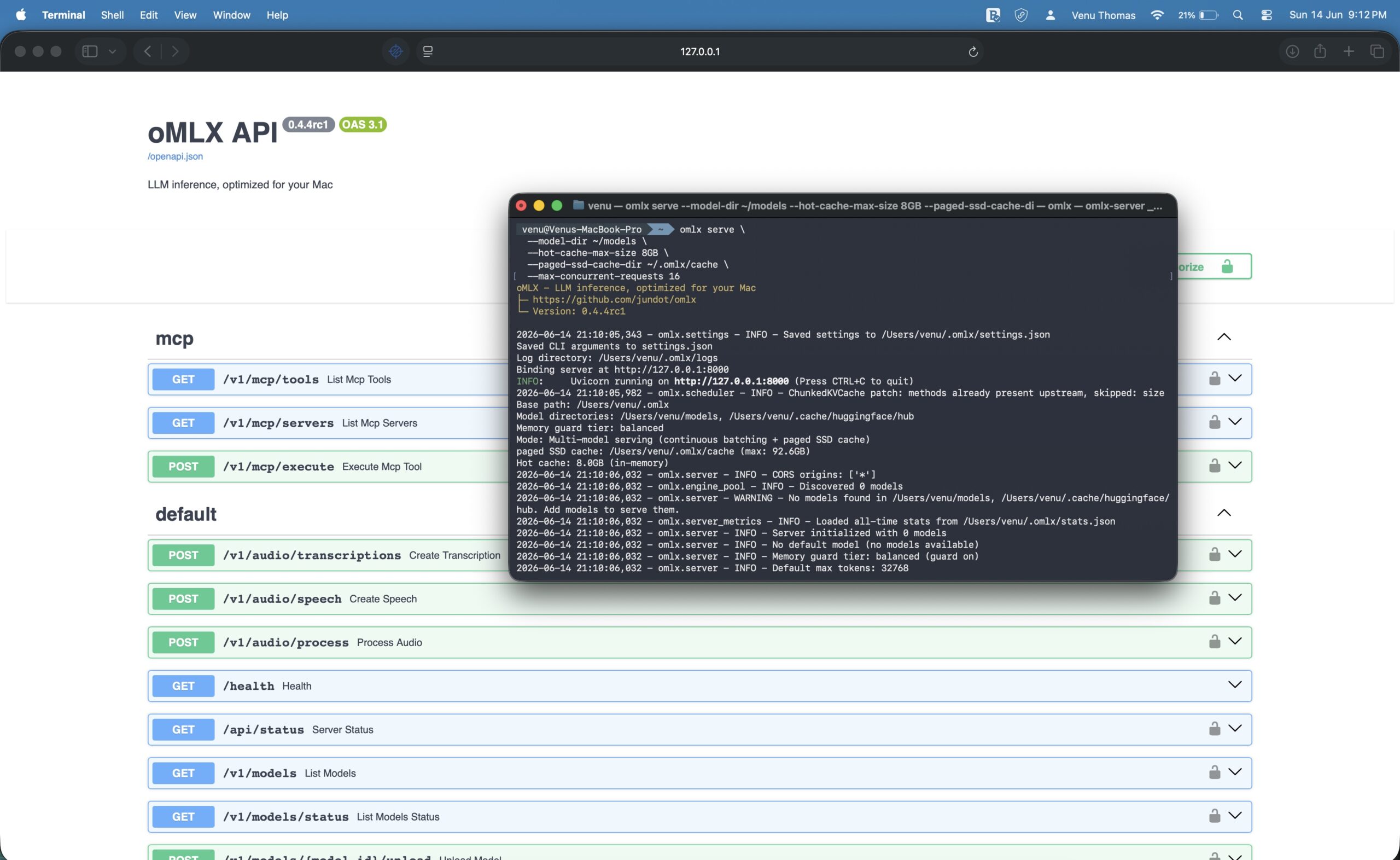
Note: oMLX includes a native macOS menu bar app for monitoring temperature, model status and downloads. MTPLX: Multi-Tenant Serving
The Purpose
MTPLX extends oMLX for scenarios where multiple users or services share one inference server. It adds resource isolation and standard API compatibility.
Key Features
- OpenAI API compatibility
- Anthropic API compatibility
- Resource isolation between users
- Production-ready deployment
Installation & Usage
brew install youssofal/mtplx/mtplx
mtplx start --profile sustained --port 8000
The –profile sustained option configures the server for continuous operation rather than burst workloads. The –port 8000 exposes the server on port 8000, the standard port for many local development tools.
When to Use Each Tool
| Scenario | Recommended Tool |
|---|---|
| Python scripting & experiments | MLX LM |
| IDE integrations & coding agents | oMLX |
| Team deployments & API compatibility | MTPLX |
Quick Start with Codex
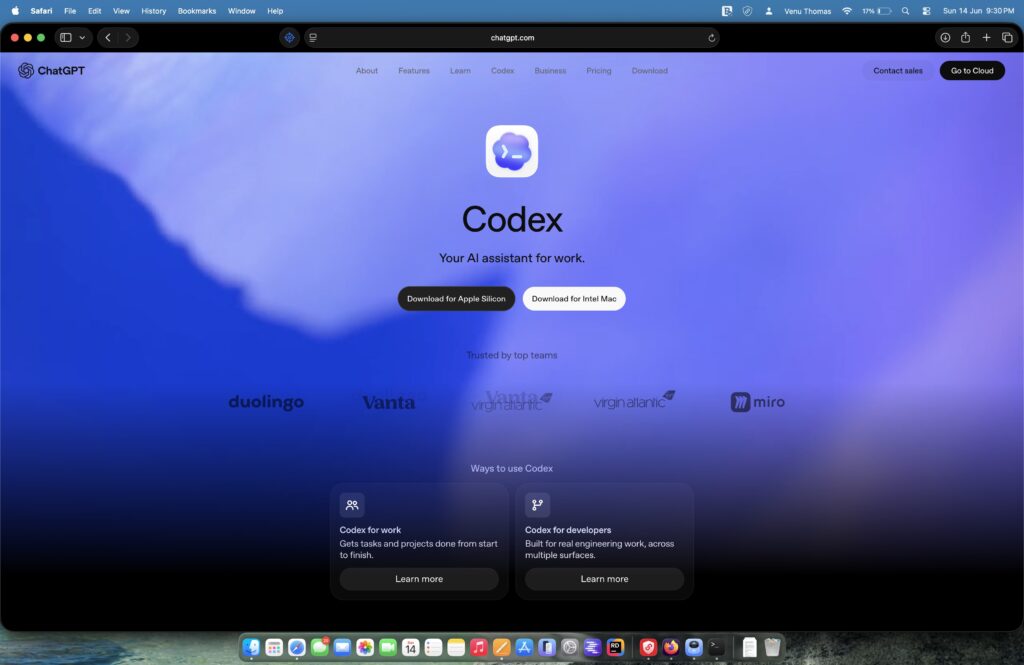
Step 1: Install Codex
Step 2: Install oMLX
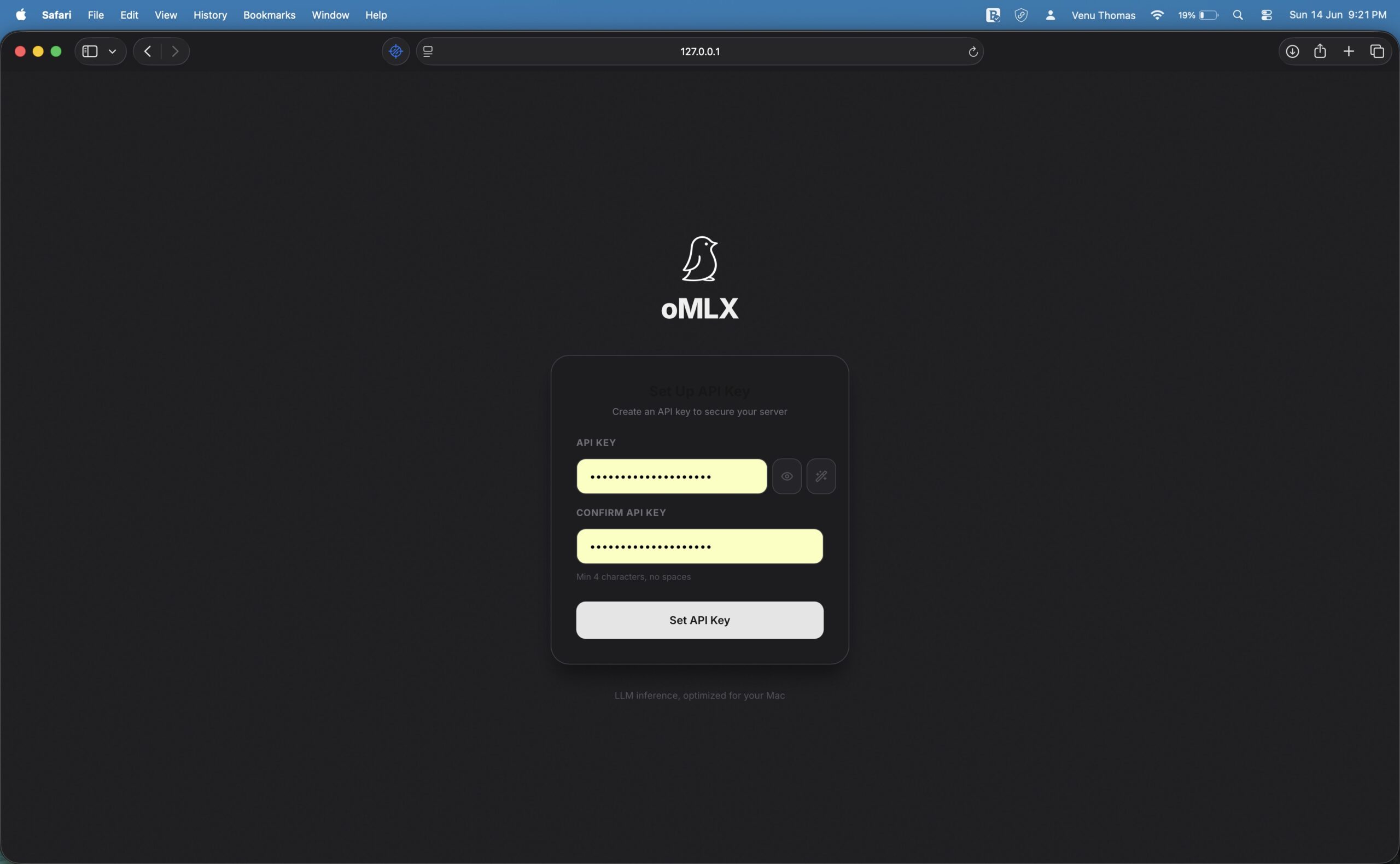
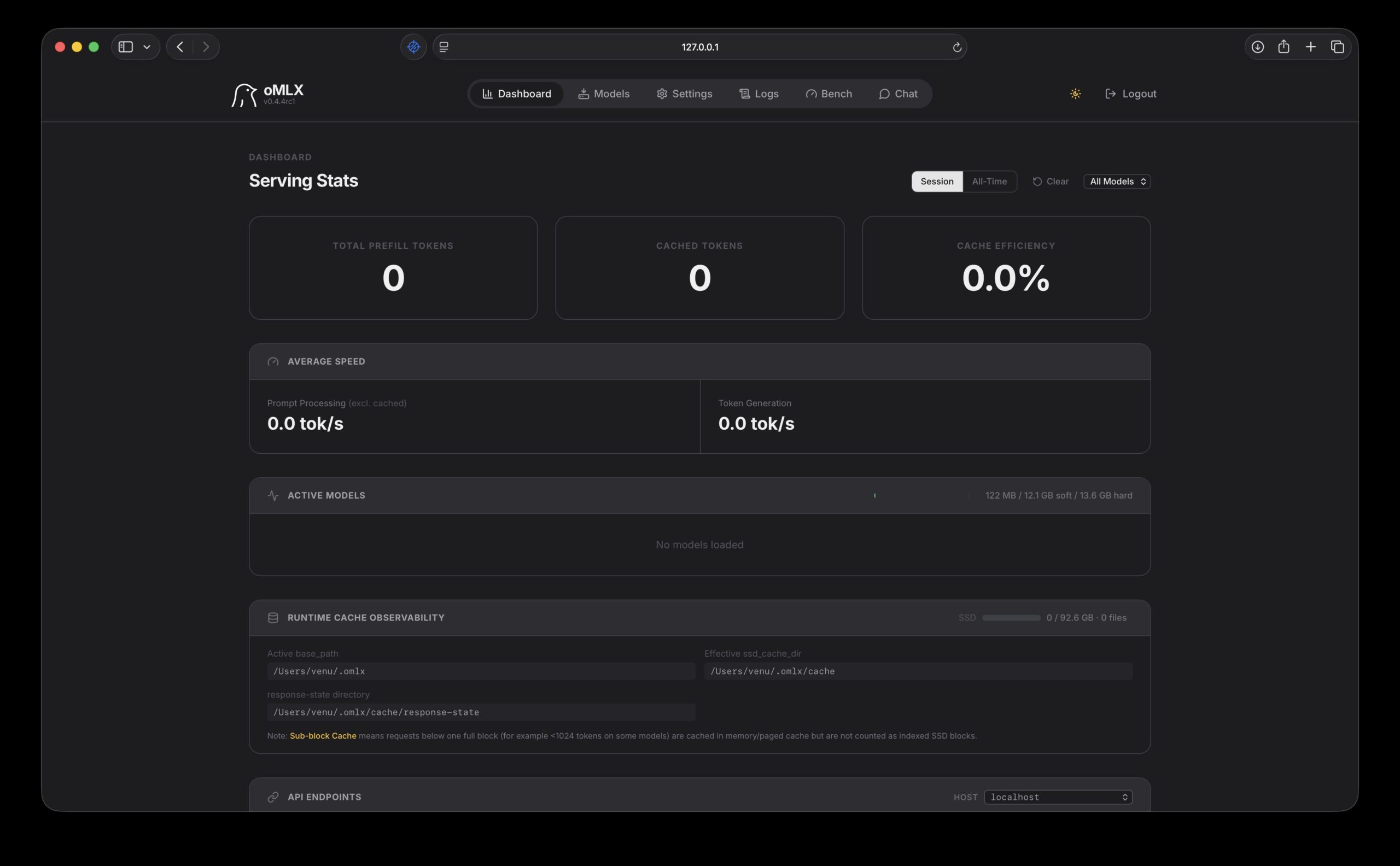
“Install omlx for me using Homebrew. The commands are:brew tap jundot/omlx https://github.com/jundot/omlx && brew install omlx. After that, launch the omlx menu bar app and verify that it is running at localhost:8000/admin.”
Step 3: Download Models
“My Mac has 24GB of RAM. Download the appropriate models for omlx: for 24GB use Qwen3.6-35B-A3B with Q4 quantization. After downloading, pin them to omlx memory.”
Step 4: Configure Local Inference
“Configure yourself to use the local omlx API at localhost:8000 for all future requests. Default to local inference instead of cloud APIs.”
Smart Routing: Local + Cloud
The Strategy
| Task Type | Route To | Why |
|---|---|---|
| Commit messages | Local | Repetitive, privacy-sensitive |
| Translations | Local | High-token, low-complexity |
| Summarization | Local | Privacy-sensitive |
| Email drafting | Local | Predictable patterns |
| Code comments | Local | Repetitive, safe |
| Complex reasoning | Cloud | Requires larger models |
| Multi-agent workflows | Cloud | Better performance |
Configuring Smart Routing in Codex
I sent the following prompt to Codex:
“Configure the Codex desktop app to use the local oMLX API at http://127.0.0.1:8000/v1 with OpenAI compatibility. Set up routing rules so that commit messages, batch translations, document summarization, email drafting and simple code commenting are handled by the local Qwen3.6-35B-A3B model. Route multi-agent workflows, long-form projects and complex reasoning tasks to cloud-based GPT-5.”
Codex generated a configuration similar to this:
[providers.local]
base_url = "http://127.0.0.1:8000/v1"
api_key = "local"
model = "qwen3.6-35b-a3b"

[routing]
commit_message = "local"
translate = "local"
summarize = "local"
email_draft = "local"
code_comment = "local"
default = "cloud"
What Each Routing Rule Does
Cost Savings
Heavy Codex users often see monthly bills jump from $20 to $100-200. Analysis shows 80 percent of tokens are consumed by the five repetitive tasks listed above. Once smart routing is configured, those tokens cost nothing. For power users, saving $20-200 per month is a realistic outcome.
Best for Casual Use vs Power Users
Model Recommendations by RAM
| RAM | Recommended Model | Memory Used | Notes |
|---|---|---|---|
| 8GB | Qwen3.5:4b Q4_K_M | ~3.4GB | Great for beginners |
| 16GB | Qwen3.5:9b Q4_K_M | ~6.6GB | Best balance for 16GB |
| 24GB | Qwen3.6-35B-A3B Q4_K_M | ~21–22GB | Sweet spot for 35B models |
| 32GB | Qwen3.6-35B-A3B Q4_K_M | ~21–22GB | Comfortable with 32K context |
| 48GB+ | Qwen3.6-35B-A3B Q5_K_M | ~25–26GB | Higher quality, 128K context |
| 64GB+ | Q6_K or Q8_0 | ~29–36GB | Near-lossless quality |
Why Qwen Models?
The Qwen family performs exceptionally well on Apple Silicon. Qwen3.6-35B-A3B uses a Mixture of Experts architecture with 35 billion total parameters and 3 billion active. Its SWE-bench Verified score of 73.4 places it in the same league as Claude Sonnet 4.5. The mlx-community organization on Hugging Face maintains pre-converted versions specifically for MLX, available within days of release.
Important MoE Clarification
Quantization size is calculated based on total parameters (35B), not active parameters (3B). All 64 expert weights must reside in memory because the system cannot predict which expert the next token will route to. So the file size and memory usage are roughly equivalent to a dense 35B model. The speed advantage comes from computing only 3B parameters per token, but the memory footprint remains that of a 35B model.
The Ecosystem Context
Industry Validation
- Early 2026: Ollama switched to MLX as its inference engine on Apple Silicon
- WWDC 2025: Apple dedicated three sessions to MLX, establishing it as the preferred framework
Tool Comparison
| Tool | Strength |
|---|---|
| MLX LM | Simplest entry point |
| oMLX | Persistent caching for agents |
| MTPLX | Multi-tenant + API compatibility |
| Ollama | Popular but slower |
| LM Studio | GUI-focused |
Conclusion
Your MacBook Pro with Apple Silicon is powerful AI hardware. The right software unlocks it:
- Start simple — Use MLX LM to generate text with Python
- Level up — Install oMLX for persistent caching and faster responses
- Optimize costs — Configure smart routing to use local models for repetitive tasks
- Scale if needed — Use MTPLX for team deployments
Quick Wins
| Action | Benefit |
|---|---|
| Install oMLX | 2× faster than Ollama |
| Configure smart routing | Save $20–200/month |
| Use persistent cache | No context loss on restart |
Local inference isn’t a compromise. With these tools, it’s faster, more private and more controllable than cloud APIs.
Your MacBook Pro was designed for this. Now you have the tools to unlock it.
Resources & Links
Official Documentation
| Resource | Link | Description |
|---|---|---|
| MLX GitHub | github.com/ml-explore/mlx | Core framework |
| MLX LM | github.com/ml-explore/mlx-lm | Language model tools |
| oMLX | github.com/jundot/omlx | Inference server |
| MTPLX | github.com/youssofal/mtplx | Multi-tenant server |
Recommended Models
| Model | Size | Good For |
|---|---|---|
| Qwen2.5-7B-Instruct-4bit | ~4GB | General use, fast |
| Qwen2.5-14B-Instruct-4bit | ~8GB | Balanced quality |
| Qwen3.6-35B-A3B-4bit | ~21GB | Complex reasoning |
| CodeLlama-13B-4bit | ~7GB | Code-focused |
| Mistral-7B-Instruct-4bit | ~4GB | General, efficient |
Quick Reference Card