Google’s Gemma 4 represents a significant leap forward in open-source AI models. Released in April 2026 under the permissive Apache 2.0 license, this family of models brings frontier-level reasoning capabilities directly to your local machine (yahoo.com). Built on the same foundational research as Gemini 3, Gemma 4 is specifically designed to run efficiently on consumer hardware, from mobile devices to high-end workstations .
This guide walks you through setting up Gemma 4 on your Mac and Windows using llama-server, providing an OpenAI-compatible API for seamless integration with existing tools and applications.
Understanding the Model Variants
If you are new to AI models and want to understand how parameter sizes relate to hardware requirements, refer to my previous article.
https://wisecodes.venuthomas.in/2025/08/24/ai-model-basics-understanding-size-hardware-and-setup/
It covers the fundamentals of model quantization, memory calculations and why bigger models do not always mean better results on consumer hardware.
Gemma 4 comes in four distinct configurations, each optimized for different hardware constraints : (yahoo.com)
| Model | Parameters | Best For | Memory Requirements |
|---|---|---|---|
| E2B | ~2B effective | Mobile / Edge devices | ~4–6 GB |
| E4B | ~4B effective | Laptops with 16GB RAM | ~9.6 GB |
| 26B A4B | 26B total (4B active MoE) | Developer workstations (24GB+) | ~17–20 GB |
| 31B | 31B dense | High-end GPUs (80GB H100) | ~62+ GB |
The 26B and 31B models rank 3rd and 6th respectively on the Arena AI text leaderboard, demonstrating performance that rivals models 20 times their size . For context windows, the smaller models support up to 128K tokens, while the 26B and 31B variants extend to an impressive 256K tokens, enabling analysis of entire codebases or lengthy documents in a single session . (unsloth.ai)
Prerequisites
Before proceeding, ensure your system meets the following requirements:
- macOS with Apple Silicon (M1/M2/M3/M4/M5 series) or Windows 10/11 with CUDA-capable GPU or CPU-only mode
- Homebrew (macOS) or vcpkg/Visual Studio (Windows) for dependency management
- 24GB RAM minimum for the 26B model (32GB recommended)
- Sufficient storage (~15-20GB for quantized models)
- Network access to Hugging Face for model downloads
Installation
macOS: Install llama.cpp via Homebrew
The llama-server binary is distributed as part of the llama.cpp package. Install it via Homebrew:
brew install llama.cpp
This provides the llama-server command along with other utilities like llama-cli for interactive use.
Windows: Install llama.cpp
For Windows systems, you have multiple installation options:
Option 1: Pre-built Binaries
Download the latest Windows release from the llama.cpp GitHub releases page. Extract the archive and add the folder to your system PATH.
Option 2: Build from Source with CUDA (Recommended for NVIDIA GPUs)
# Clone the repository
git clone https://github.com/ggml-org/llama.cpp.git
cd llama.cpp
# Build with CUDA support using CMake
cmake -B build -DGGML_CUDA=ON
cmake --build build --config Release
# The llama-server.exe will be in build/bin/Release/
Option 3: Build CPU-Only Version
cmake -B build
cmake --build build --config Release
Downloading and Serving the Model
The ggml-org organization on Hugging Face maintains official GGUF conversions of Gemma 4 models . These are optimized for llama.cpp and support various quantization levels.
macOS Command
For a Mac with 24GB RAM, the recommended starting point is the 26B A4B model with Q4_K_M quantization:
llama-server -hf ggml-org/gemma-4-26b-a4b-it-GGUF:Q4_K_M
Windows Command
For Windows with 24GB VRAM (RTX 3090/4090):
.\llama-server.exe -hf ggml-org/gemma-4-26b-a4b-it-GGUF:Q4_K_M -ngl 99
For Windows CPU-only or limited VRAM, reduce GPU layers or run entirely on CPU:
# CPU-only mode
.\llama-server.exe -hf ggml-org/gemma-4-26b-a4b-it-GGUF:Q4_K_M -ngl 0
# Partial GPU offload (adjust based on your VRAM)
.\llama-server.exe -hf ggml-org/gemma-4-26b-a4b-it-GGUF:Q4_K_M -ngl 40
This single command handles both model download and server startup. The -hf flag instructs llama-server to fetch the model directly from Hugging Face if not already cached locally .
Important considerations for model selection:
- Q4_K_M: 4-bit quantization, balanced quality and speed (recommended for 24GB systems)
- Q8_0: 8-bit quantization, higher quality but requires more memory
- Q4_0: Fastest, smallest, but may impact reasoning quality
Adjust the quantization based on your available memory. Forcing a larger model than your RAM can accommodate results in excessive disk swap usage, degraded performance, and potential system instability.
Server Configuration
By default, llama-server binds to port 8080. You can customize this and other parameters.
macOS Configuration
llama-server \
  -hf ggml-org/gemma-4-26b-a4b-it-GGUF:Q4_K_M \
  --port 8089 \
  -ngl 99 \
  -c 32768 \
  --jinja
Windows Configuration
.\llama-server.exe `
  -hf ggml-org/gemma-4-26b-a4b-it-GGUF:Q4_K_M `
  --port 8089 `
  -ngl 99 `
  -c 32768 `
  --jinja
Flag explanations:
| Flag | Purpose |
|---|---|
--port 8089 |
HTTP API port (change if 8080 is occupied) |
-ngl 99 |
Offload layers to GPU (99 for full offload on macOS Metal, adjust for Windows CUDA) |
-c 32768 |
Context window size in tokens (32K recommended for 24GB systems) |
--jinja |
Enable Jinja2 chat templates for proper tool calling support |
For your 24GB Mac M5 Pro or Windows PC with RTX 3090/4090, a 32K context window provides optimal balance between capability and memory usage. You can increase to 64K if you close other applications, but 128K is only viable on 32GB+ systems (GitHub Gist)
Using the Web Interface
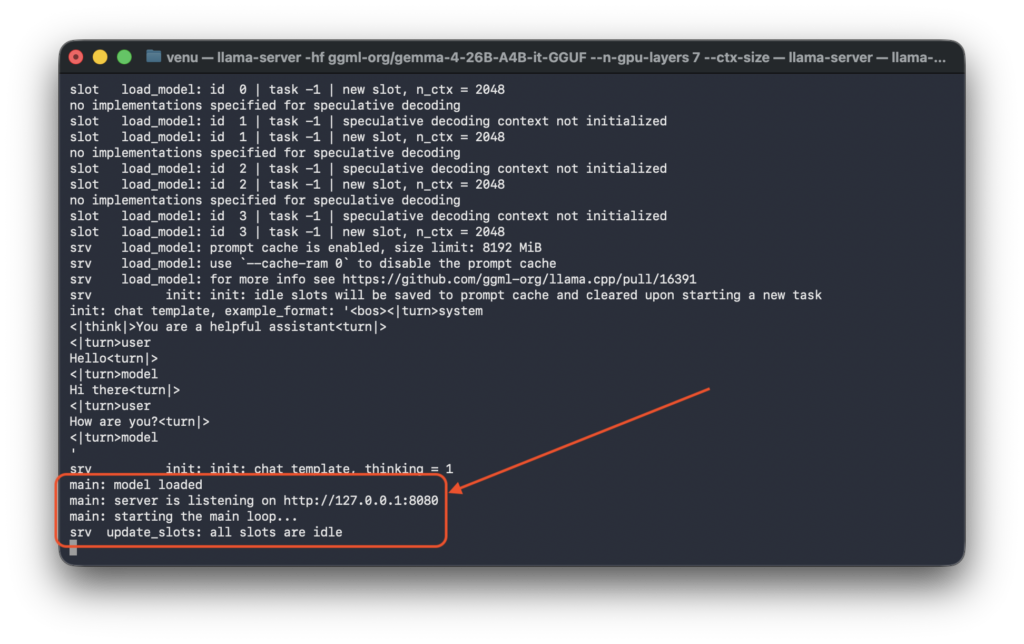
Once the server displays listening on http://127.0.0.1:8080 , you can immediately interact with the model through the built-in web interface at http://127.0.0.1:8080 . This provides a user-friendly way to test the model without writing any code.
Multimodal Capabilities: Vision and Code Generation
Gemma 4 is a multimodal model capable of processing images alongside text . The web interface allows you to upload images directly and request analysis or code generation based on visual input.
Practical Example: UI-to-Code Workflow
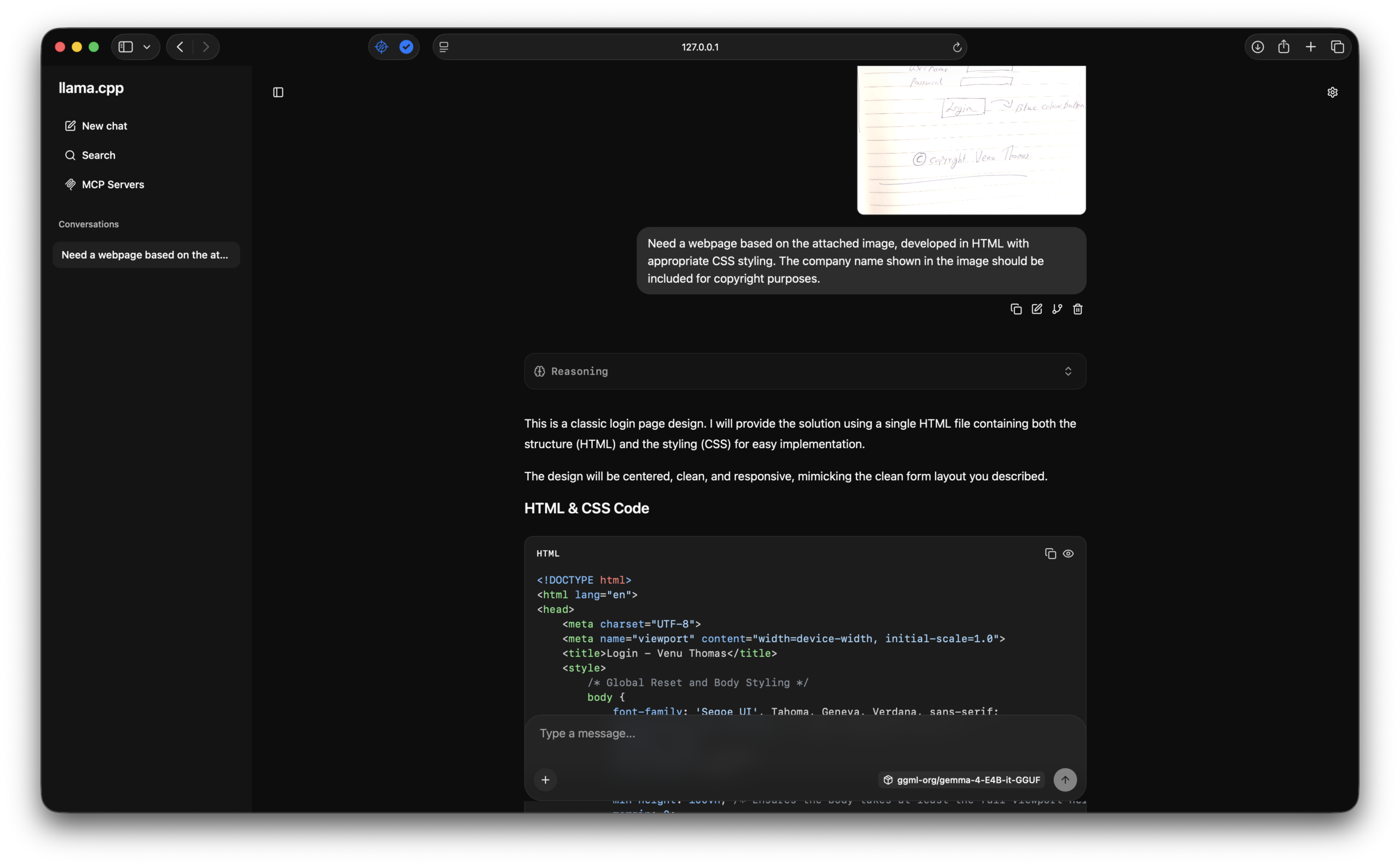
Real-world workflow: Upload a hand-drawn sketch of a login page to http://127.0.0.1:8080 , then submit the following prompt:
“Need a webpage based on the attached image, developed in HTML with appropriate CSS styling. The company name shown in the image should be included for copyright purposes.”
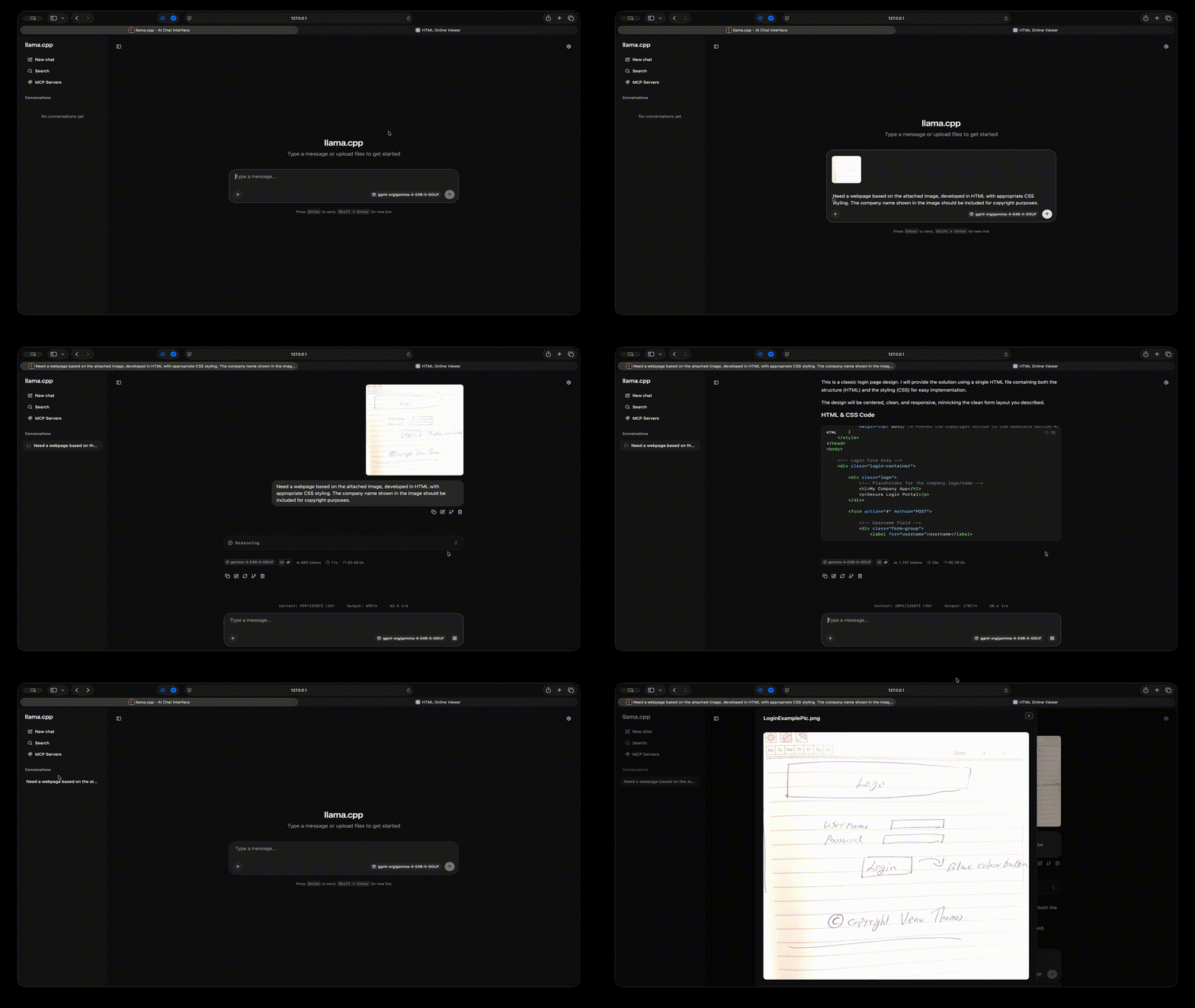
The model analyzes the visual layout, including the “Logo” header, username/password form fields, blue “Login” button, and the copyright notice “© Copyright Venu Thomas”, and generates production-ready HTML and CSS. The output faithfully reproduces the design structure with proper semantic markup, responsive styling, and the requested copyright attribution.
This capability bridges the gap between design mockups and implementation, significantly accelerating frontend development workflows by converting visual concepts directly into functional code.
Making API Requests
For programmatic access, the server exposes an OpenAI-compatible Chat Completions API at /v1/chat/completions.
Basic cURL Example (macOS/Linux)
curl --location 'http://127.0.0.1:8080/v1/chat/completions' \
--header 'Content-Type: application/json' \
--header 'Authorization: Bearer llama.cpp' \
--data '{
    "model": "ggml-org-gemma-4-26b-a4b-gguf",
    "messages": [
        { "role": "user", "content": "What's the capital of Kerala?" }
    ],
    "temperature": 0.7,
    "max_tokens": 150,
    "stream": false
}'
Basic cURL Example (Windows PowerShell)
Invoke-RestMethod -Uri 'http://127.0.0.1:8080/v1/chat/completions' `
  -Method Post `
  -Headers @{
    'Content-Type' = 'application/json'
    'Authorization' = 'Bearer llama.cpp'
  } `
  -Body '{
    "model": "ggml-org-gemma-4-26b-a4b-gguf",
    "messages": [
      { "role": "user", "content": "What's the capital of Kerala?" }
    ],
    "temperature": 0.7,
    "max_tokens": 150,
    "stream": false
  }'
Expected Response
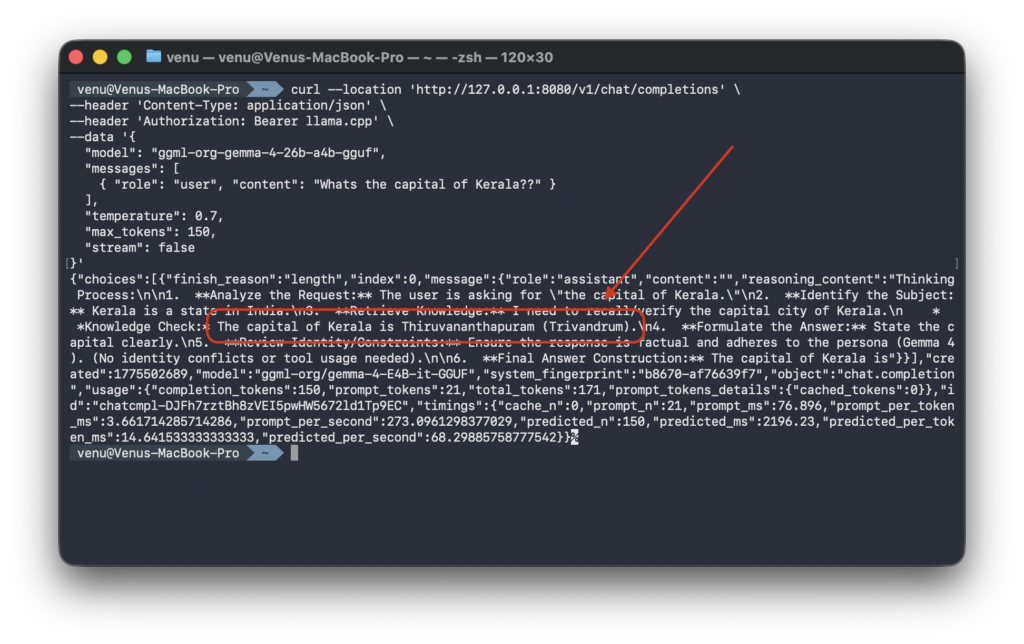
The timings field provides valuable performance metrics, showing approximately 127 tokens/second for prompt processing and 34 tokens/second for generation on Apple Silicon, and similar or faster speeds on NVIDIA RTX GPUs with CUDA
Hardware-Specific Recommendations
Based on extensive community testing, here are the optimal configurations for different setups:
| Hardware | Recommended Model | Notes |
|---|---|---|
| MacBook 16GB | Gemma 4 E4B (4B) | Smooth operation, no swap usage |
| MacBook 24GB (M3/M4/M5 Pro) | Gemma 4 26B (Q4_K_M) | Balanced performance and quality |
| Windows PC + RTX 3090 (24GB) | Gemma 4 26B (Q4_K_M) | Good GPU acceleration |
| Windows PC + RTX 4090 (24GB) | Gemma 4 26B (Q4_K_M) or Q8_0 | Excellent CUDA performance |
| Windows PC + RTX 5090 (32GB) | Gemma 4 26B (Q8_0) or higher | Maximum quality quantization |
| Windows PC CPU-only (32GB+ RAM) | Gemma 4 E4B or 26B (Q4_K_M) | Slower but functional |
Critical warning for 16GB systems: Do not attempt to run the 26B or 31B models on 16GB RAM or VRAM. Despite having “only” 26B parameters, these models require substantial memory for the KV cache and overhead. Attempting to force deployment results in garbled output, system freezes, and excessive disk swap wear . For 16GB systems, use ollama run gemma4:e4b instead, which provides a streamlined experience for the E4B variant.
Conclusion
Running Gemma 4 locally via llama-server provides a powerful, privacy-preserving AI development environment. With your Mac M5 Pro’s 24GB unified memory or a Windows PC with a 24GB VRAM GPU, you can leverage the 26B A4B model for sophisticated coding tasks, document analysis, and multimodal workflows without relying on cloud APIs.
The OpenAI-compatible API ensures seamless integration with existing tools, while the Apache 2.0 license removes commercial usage restrictions, making Gemma 4 suitable for both personal projects and enterprise applications .
Start with the Q4_K_M quantization, monitor your memory usage, and explore the model’s capabilities through both the built-in web interface at http://localhost:8080 and direct API calls.